How to Create Stunning Jewelry Macro Photography (The Complete 2026 Guide)
Master jewelry macro photography with AI. Learn professional techniques for capturing gemstone sparkle, intricate details, and luxury close-ups that sell. Step-by-step tutorial with examples.
How to Create Stunning Jewelry Macro Photography (The Complete 2026 Guide)
You've spent $5,000 on a beautiful diamond ring. The craftsmanship is exquisite - delicate prongs, brilliant facets, flawless setting. You photograph it for your Etsy shop or jewelry website. But in the photos? It looks like a $50 piece from a mall kiosk.
The problem isn't your jewelry. It's that photographing jewelry - especially macro close-ups that show its true beauty - requires specialized equipment, perfect lighting, and technical expertise that most sellers don't have.
Until now.
This guide covers everything you need to know about jewelry macro photography in 2026, including how AI-powered tools can create professional macro shots that rival $500/hour jewelry photographers - without the equipment, studio, or technical knowledge.
What is Jewelry Macro Photography?
Macro photography means extreme close-up images that reveal details invisible to the naked eye. For jewelry, this means:
What You Can See in Macro Jewelry Photos:
- Individual gemstone facets catching and reflecting light
- The texture and finish of precious metals (brushed, polished, hammered)
- Intricate filigree work and engraving details
- The quality of stone settings and prong work
- Hidden craftsmanship (inside of ring bands, clasp mechanisms)
- The authentic sparkle and brilliance of diamonds and gemstones
In technical photography terms, "macro" means 1:1 magnification ratio - the image projected onto the camera sensor is the same size as the subject in real life. For commercial jewelry photography, "macro" more broadly means "extreme close-up detail photography that shows craftsmanship and quality."
Why Jewelry Macro Photography Matters
Conversion Impact
According to jewelry e-commerce data from 2025, listings with professional macro photography see:
- 32% higher conversion rates compared to standard product photos
- 47% fewer returns (customers know exactly what they're getting)
- 2.5x longer time on page (customers study the details)
- Higher average order value (quality photography signals quality products)
The Trust Factor
When someone buys jewelry online - especially fine jewelry - they're making a significant purchase without seeing the item in person. Macro photography bridges this gap by answering the questions running through every buyer's mind:
- Is this real gold or just plated?
- Are those real diamonds or CZ?
- How good is the craftsmanship?
- Will it look cheap in person?
- Can I see the actual quality of the stones?
A single macro shot showing genuine diamond facets and solid gold prongs answers all these questions instantly.
The Premium Positioning Effect
Here's something most jewelry sellers miss: the quality of your photography directly affects how much customers are willing to pay.
Show a diamond ring in a blurry, poorly lit photo → Customers assume it's cheap and expect cheap prices.
Show the same ring with professional macro photography revealing brilliant facets and flawless craftsmanship → Customers perceive it as luxury and accept premium pricing.
You're not just photographing jewelry. You're photographing value.
The Traditional Challenge of Jewelry Macro Photography
Professional jewelry photographers use setups that cost $10,000+ and require years of skill development:
Equipment Requirements
Camera and Lens: $3,000-7,000
- Full-frame DSLR or mirrorless camera
- True macro lens (100mm f/2.8 or similar)
- Lens with excellent edge-to-edge sharpness
Lighting System: $2,000-5,000
- Multiple studio strobes with softboxes
- Ring light or macro ring flash for shadowless lighting
- Light tent or sweep for controlling reflections
- Reflectors and fill cards to manage sparkle without overexposure
Support and Control: $500-1,000
- Heavy-duty tripod (no vibration allowed)
- Macro focusing rail for precise positioning
- Remote shutter release
- Light meter
Post-Processing: $1,000+
- Professional editing software (Capture One, Photoshop)
- Calibrated monitor
- Focus stacking software for depth of field
- Hours of editing per image
Technical Challenges
Even with all this equipment, jewelry macro photography is technically difficult:
1. Extreme Depth of Field Issues
At macro distances, depth of field shrinks to millimeters. When shooting a ring at f/5.6 (common for product photography), you might only have 2-3mm in focus. The front of a gemstone is sharp, but the back is blurred.
Professional solution: Focus stacking - taking 20-50 images at different focus points and combining them in software. This requires specialized equipment and hours of post-processing.
2. Reflection Management
Precious metals are highly reflective. Without proper setup, you'll see reflections of the camera, your hands, the room, light stands - everything except the beautiful jewelry.
Professional solution: Light tents, polarizing filters, specific angles, and hours of trial and error to eliminate unwanted reflections.
3. Capturing Sparkle Without Overexposure
Diamonds and gemstones create brilliant points of light. Too little light, and they look dull. Too much, and you get blown-out white spots that obscure the facets.
Professional solution: Bracketing exposures, using strobes with precise power control, and careful post-processing to preserve both highlights and detail.
4. Accurate Color Representation
Gold isn't just "gold" - there's yellow gold, white gold, rose gold, and variations within each. Gemstones have subtle color variations that determine value.
Professional solution: Custom white balance, color-calibrated workflows, and reference chips to ensure accuracy.
This is why jewelry brands pay $200-500 per image for professional macro photography. The skill, equipment, and time required justify the cost.
But what if there was a better way?
AI-Powered Jewelry Macro Photography: The 2026 Solution
Modern AI can now generate professional jewelry macro photography from simple product photos. Here's how it works and why it's revolutionary:
How AI Jewelry Macro Photography Works
You upload a basic product photo of your jewelry piece - even a smartphone photo with basic lighting works. The AI:
- Identifies the jewelry type (ring, necklace, earrings, bracelet, watch)
- Analyzes the materials (gold, silver, gemstones, pearls)
- Generates professional macro compositions showing:
- Extreme close-ups with proper depth of field
- Authentic sparkle and brilliance
- Beautiful backgrounds (silk, bokeh, natural textures)
- Professional lighting that eliminates harsh reflections
- Multiple angles showcasing craftsmanship
The result: Professional macro photography that would cost $500+ from a traditional photographer, generated in minutes.
What Makes AI Macro Photography Different
Traditional DIY Photography:
- Requires expensive equipment
- Steep learning curve
- Hours per image
- Inconsistent results
- No focus stacking capability
- Difficult to achieve professional lighting
AI Macro Photography:
- No equipment needed beyond phone or basic camera
- No technical knowledge required
- Minutes per image
- Consistently professional results
- Perfect depth of field automatically
- Professional lighting by default
Traditional Professional Photography:
- $200-500 per image
- Requires booking and scheduling
- Multiple rounds of revisions
- Works great for established brands with budget
AI Professional Photography:
- Fraction of the cost
- Instant generation
- Unlimited variations
- Perfect for independent sellers, Etsy shops, small brands
How to Create Jewelry Macro Photography with Prontoshoot
Let me walk you through the exact process of creating professional jewelry macro photography using AI. This takes about 3 minutes from start to finish.
Step 1: Upload Your Jewelry Photo
Start with a clear product photo of your jewelry piece. This can be:
- A smartphone photo with decent lighting
- An existing product photo from your supplier
- A basic DSLR shot without fancy setup
- Even a photo with a busy background (AI will handle it)
What makes a good source photo:
- The jewelry piece is clearly visible
- Basic lighting (doesn't need to be professional)
- Reasonable focus (not blurry)
- Any background works
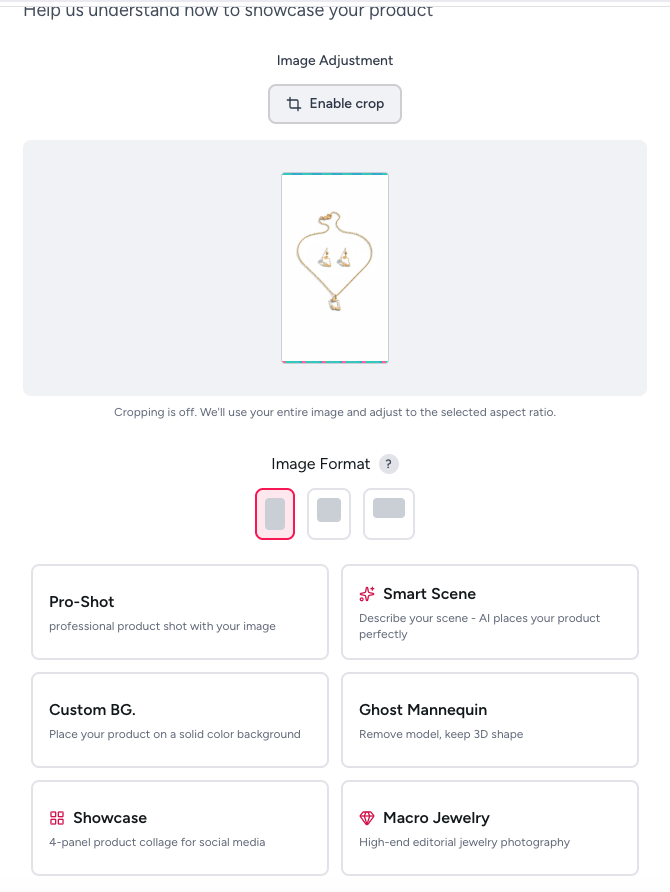
Example: Here's a simple product photo of earrings taken with an iPhone in natural light. Nothing fancy, but the earrings are visible and in focus.
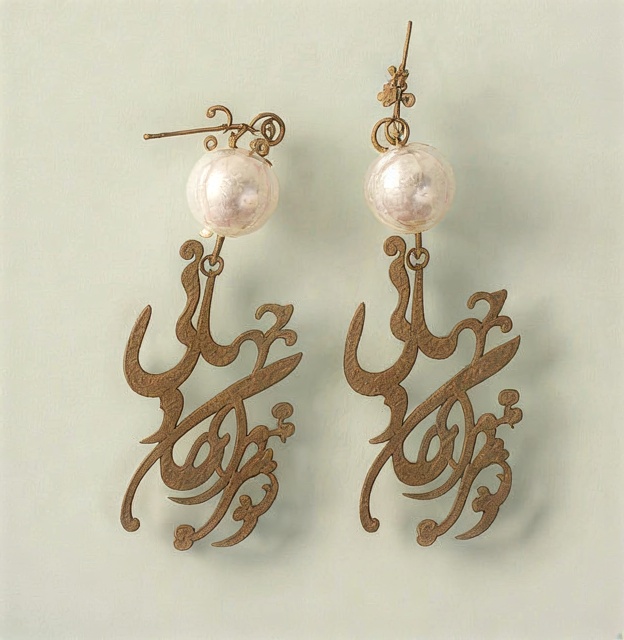
Step 2: Select Macro Photography Style
Once uploaded, choose between two macro photography styles:
Macro (Standard)
- Professional close-up jewelry photography
- Beautiful backgrounds (silk, bokeh, natural textures)
- Great for e-commerce listings
- Shows jewelry with artistic styling
- Perfect for Etsy, Shopify, social media
Showcase Macro (Extreme Detail)
- Ultra-extreme close-ups showing craftsmanship
- Focus on gemstone facets, metal texture, intricate details
- Multiple angle compositions
- Perfect for high-end jewelry, luxury brands
- Ideal for showcasing quality and authenticity
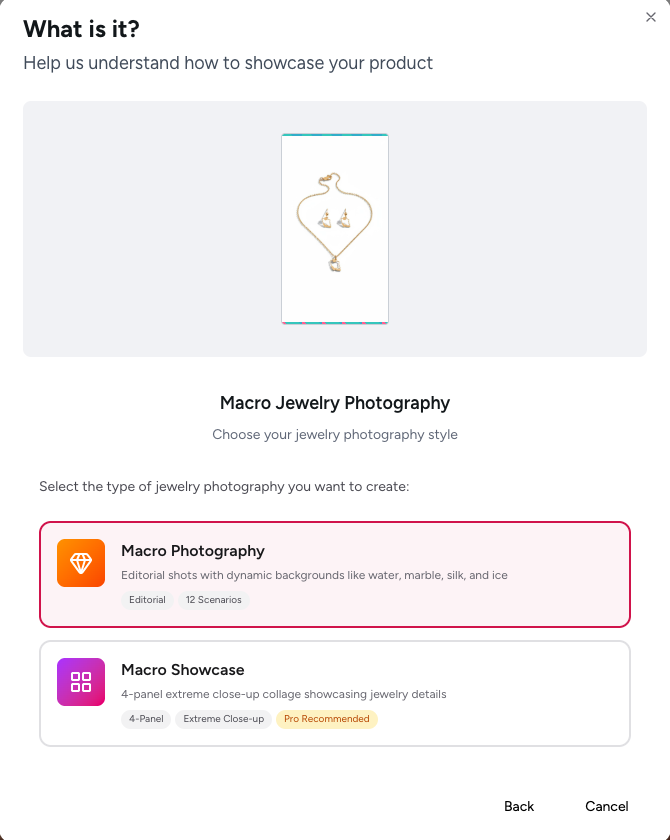
For most sellers, Macro is perfect. If you're selling high-end pieces ($500+) or want to emphasize craftsmanship, choose Showcase Macro.
Step 3: Choose Single Image or 4-Panel Showcase
Select your output format:
Single Image
- One beautiful macro shot
- Quick generation
- Perfect for single hero images
- Great for social media posts
- Ideal when you need one perfect shot
4-Panel Showcase
- Four different angles/compositions in one image
- Top panel: Hero macro shot
- Bottom three panels: Detail angles, different backgrounds, context shots
- Perfect for comprehensive product listings
- Shows the piece from multiple perspectives
- Great for Amazon, eBay, Etsy where multiple images matter
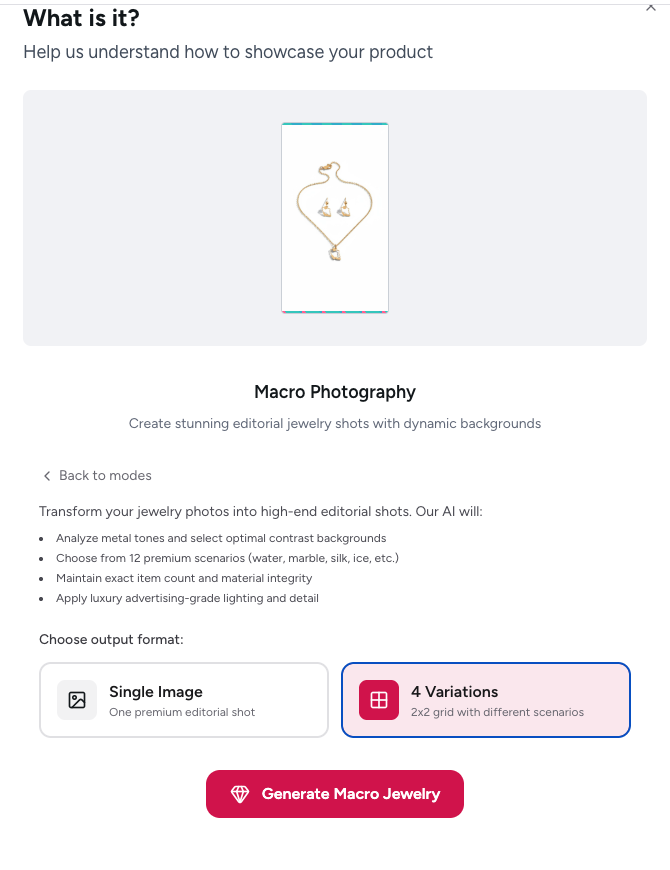
Step 4: Generate and Download
Click generate and wait 30-60 seconds. The AI will create professional macro photography with:
- Proper depth of field (sharp where it matters, beautiful blur elsewhere)
- Authentic sparkle and gemstone brilliance
- Professional lighting with controlled reflections
- Luxury backgrounds that complement the jewelry
- Composition that emphasizes quality and craftsmanship
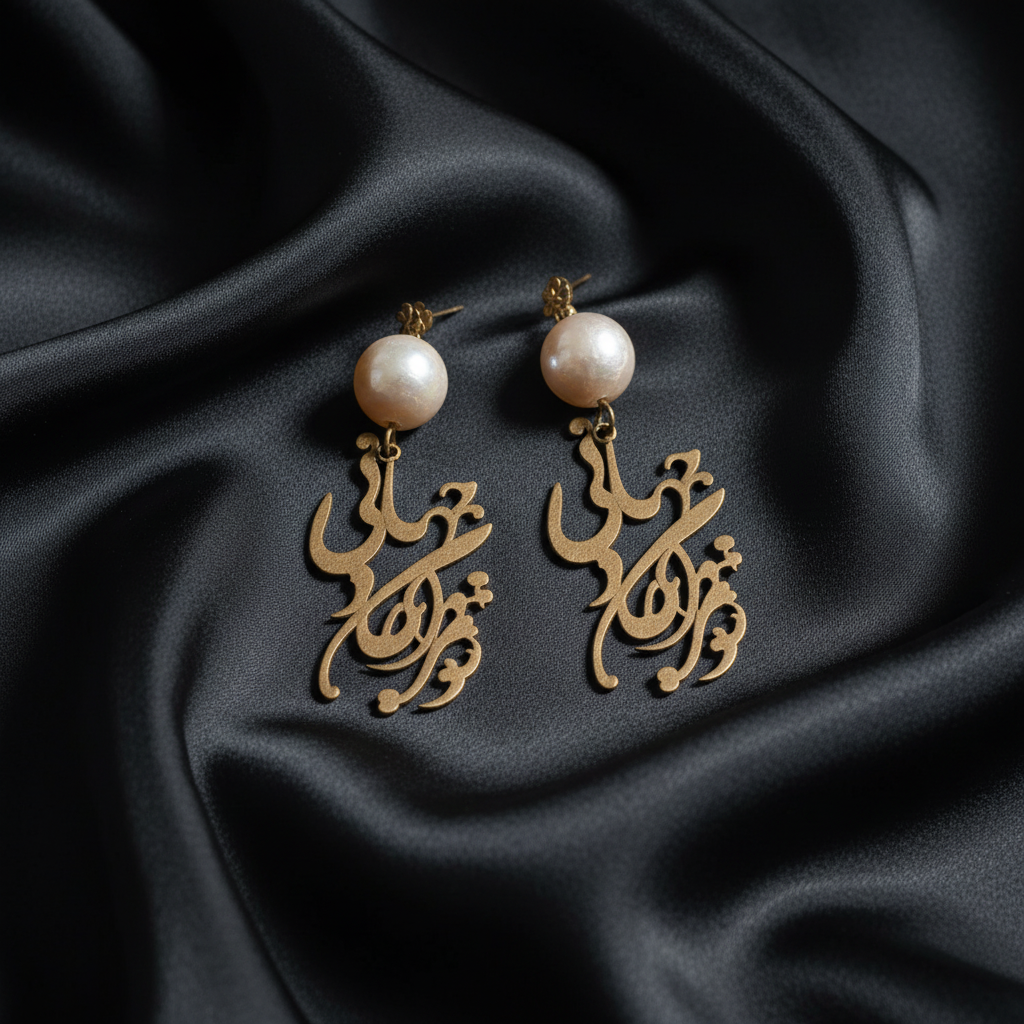
The difference is dramatic. Compare the before and after - same earrings, but the macro photo shows the quality, sparkle, and luxury that makes customers want to buy.
Real Examples: Before and After
Example 1: Pearl Earrings
Before: Basic product photo on white background. Earrings visible but no sense of quality or craftsmanship.
After: Professional macro photography showing:
- Pearl luster and quality
- Gold metalwork detail
- Beautiful bokeh background
- Luxury presentation
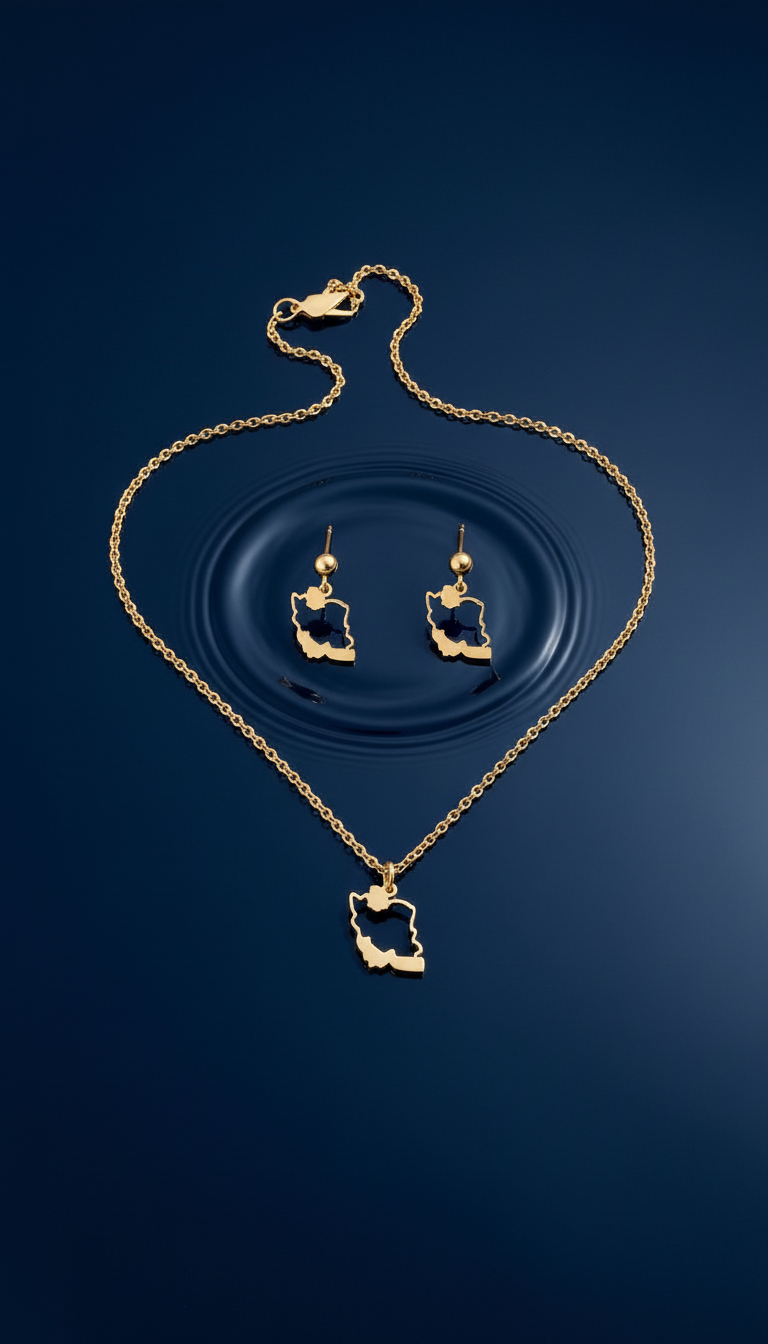
Example 2: Custom Jewelry Set
Before: Simple product photo showing the jewelry set.
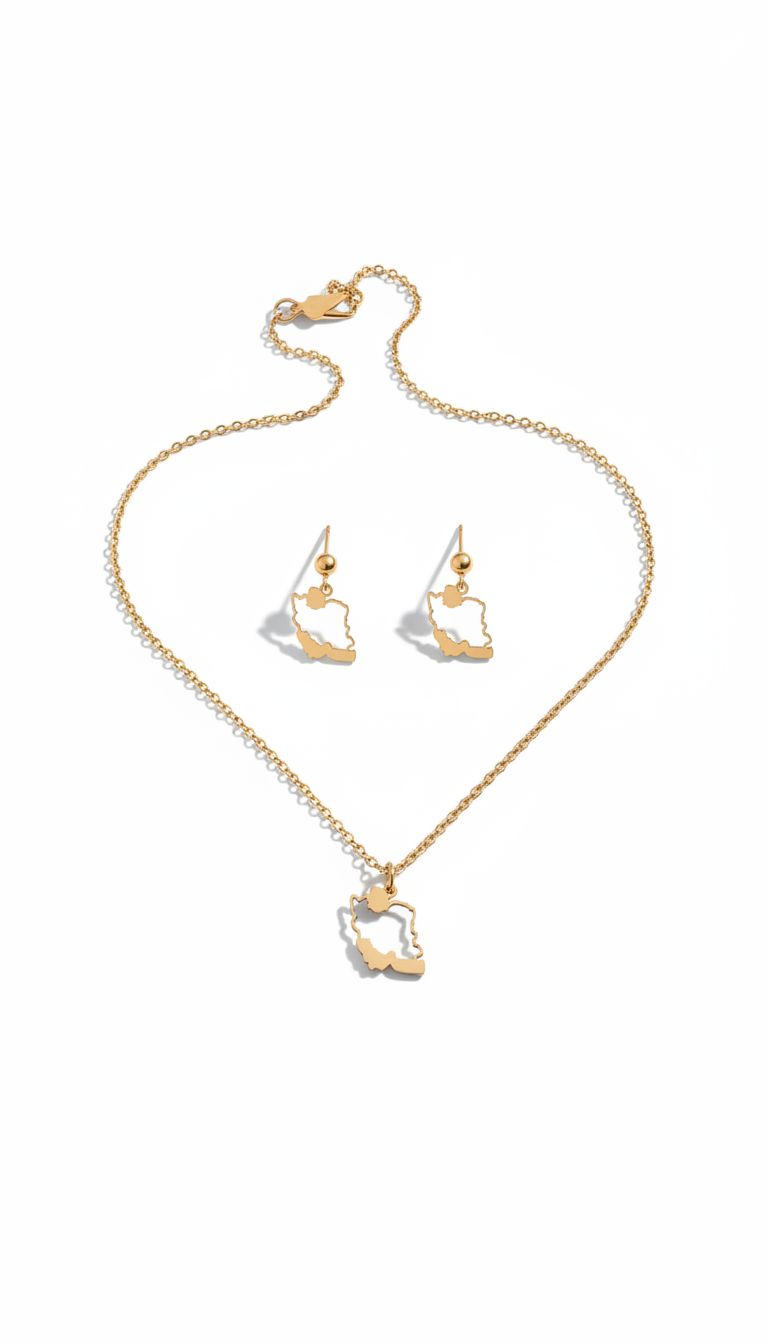
After: Macro photography revealing:
- Intricate metalwork and calligraphy
- Pearl detail and setting quality
- Multiple styled shots with different backgrounds
- Professional presentation
Example 3: Showcase Macro - Ultimate Detail
Before: Standard jewelry photo.
After: Showcase macro with 4-panel composition:
- Top: Extreme close-up hero shot with perfect bokeh
- Bottom panels: Multiple detail angles showing craftsmanship
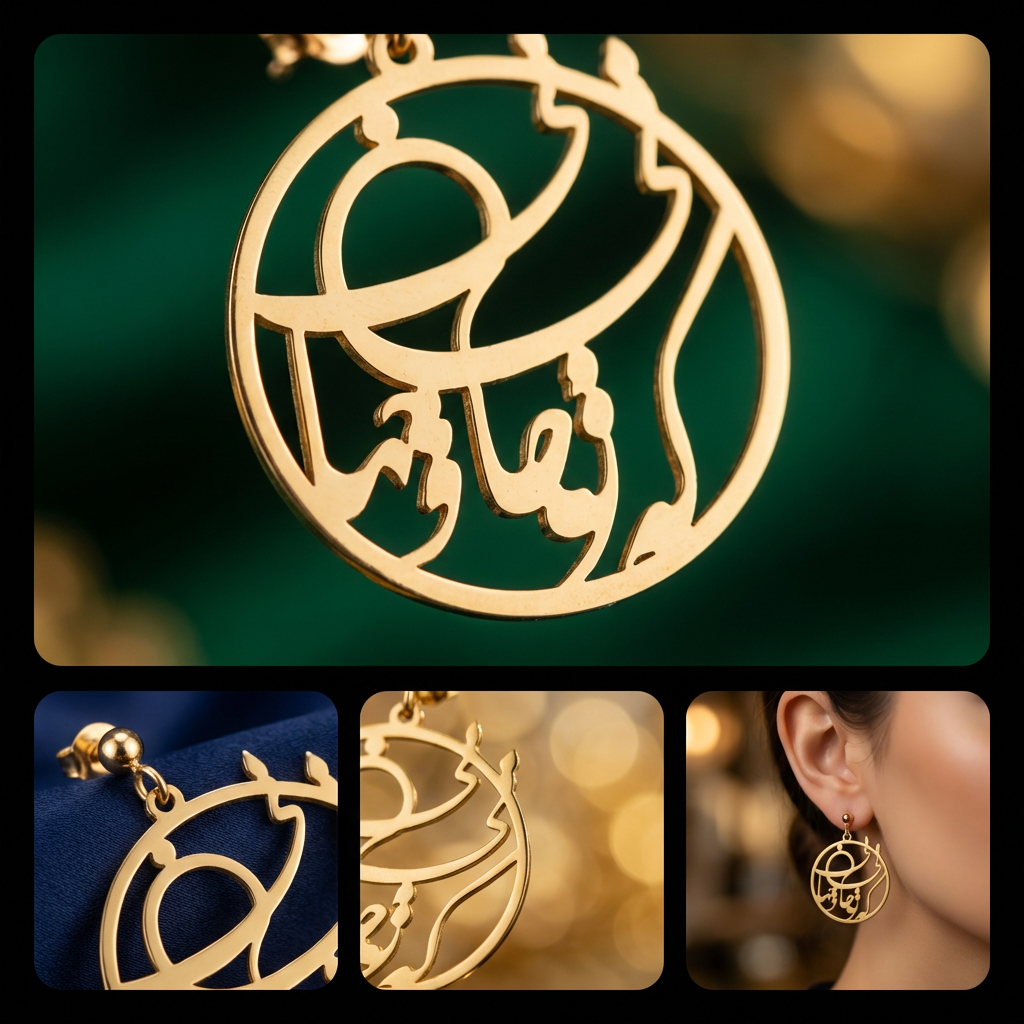
Notice how the showcase macro goes even further - you can see individual metal texture, the way light plays across surfaces, and details that prove authenticity and quality.
When to Use Different Macro Styles
Standard Macro - Best For:
Etsy Sellers
- Handmade jewelry that needs artistic presentation
- Customers who buy based on style and aesthetic
- Budget-conscious sellers who need great results quickly
- Jewelry in the $25-300 range
Shopify Stores
- Fashion jewelry and accessories
- Lifestyle brands with aesthetic focus
- Social media marketing (Instagram, Pinterest)
- Building a cohesive brand look
Amazon/eBay Listings
- Secondary images showing detail
- Supporting images that complement main product shots
- Showing jewelry styled in different ways
Showcase Macro - Best For:
Fine Jewelry Brands
- Diamond rings, engagement rings
- High-end gemstone jewelry ($500+)
- Custom jewelers showcasing craftsmanship
- Luxury positioning
Certification and Trust
- Proving authenticity of stones and metals
- Showing quality of settings and prongs
- Emphasizing craftsmanship for custom pieces
- Competing against established luxury brands
High-Value Items
- Vintage and antique jewelry
- Designer pieces
- Investment-grade jewelry
- Items where detail determines value
Professional Jewelry Macro Photography Tips
Even with AI handling the technical aspects, these tips will help you get the best results:
Source Photo Quality Matters
Good lighting beats everything else
Take your source photo near a window with indirect natural light, or use two lamps positioned at 45-degree angles. Avoid:
- Direct sunlight (too harsh, creates hard shadows)
- Overhead lighting (flat and unflattering)
- Yellow incandescent bulbs (color cast issues)
- Flash (creates harsh reflections)
Clean your jewelry first
Use a jewelry cleaning cloth to remove fingerprints, dust, and oils. Even AI can't make smudged jewelry look good.
Shoot on a neutral background
While AI can handle any background, a simple neutral surface makes the generation cleaner. Use:
- White paper or poster board
- Black velvet or fabric
- Gray card
- Wood surface
Positioning for Best Results
Fill the frame
The jewelry should take up 60-80% of your photo. Get close enough that details are visible, but not so close that parts are cut off.
Keep it level
Use your phone's grid or a level surface. Tilted jewelry looks unprofessional even after AI processing.
Focus on the important part
For rings: Focus on the stone or setting For necklaces: Focus on the pendant or centerpiece For earrings: Make sure both earrings are visible and in focus For bracelets: Show the clasp and main decorative elements
Multiple Source Photos = Better Results
If you have several photos of the same piece from different angles, try each one. Sometimes a side angle generates better macro detail than a top-down shot.
Jewelry Macro Photography for Different Piece Types
Rings
What macro photography should show:
- Gemstone facets and brilliance (if applicable)
- Setting style and prong work
- Band texture and finish
- Inside details (if relevant)
- Size and proportions
Best practices:
- Source photo should show the ring at an angle (not flat)
- Include both the top of the stone and the band
- Clean the stone thoroughly - macro reveals every speck
Macro style to choose:
- Standard Macro: Fashion rings, costume jewelry, modern designs
- Showcase Macro: Engagement rings, diamond jewelry, heirloom pieces
Necklaces and Pendants
What macro photography should show:
- Pendant detail and craftsmanship
- Chain style and quality
- Clasp design (if decorative)
- How the pendant hangs and drapes
Best practices:
- Lay flat or photograph hanging naturally
- Make sure the chain is straight and untangled
- Show the pendant orientation (right side up)
Macro style to choose:
- Standard Macro: Most necklaces, fashion jewelry, statement pieces
- Showcase Macro: Intricate pendants, gemstone necklaces, custom designs
Earrings
What macro photography should show:
- Matching pair consistency
- Post/hook style and quality
- Gemstone detail (if applicable)
- How they catch light
Best practices:
- Photograph both earrings together
- Position them identically (same angle)
- Show the post/hook clearly
Macro style to choose:
- Standard Macro: Fashion earrings, dangle earrings, hoops
- Showcase Macro: Diamond studs, gemstone drops, luxury earrings
Bracelets
What macro photography should show:
- Link style and construction
- Clasp mechanism and quality
- Pattern or detail work
- How it drapes/hangs
Best practices:
- Show the bracelet in a natural curve (not forced flat)
- Include clasp in the frame
- For charm bracelets, arrange charms to show variety
Macro style to choose:
- Standard Macro: Most bracelets, bangle stacks, fashion jewelry
- Showcase Macro: Diamond tennis bracelets, luxury watches, fine jewelry
Watches
What macro photography should show:
- Watch face clarity and detail
- Case finish and quality
- Band/strap material and stitching
- Crown and complications (if applicable)
Best practices:
- Set the time to 10:10 (traditional watch photography)
- Clean the crystal thoroughly
- Show the watch face straight-on, not at an angle
Macro style to choose:
- Standard Macro: Fashion watches, leather strap watches, everyday timepieces
- Showcase Macro: Luxury watches, mechanical movements, Swiss timepieces
Optimizing Jewelry Macro Photos for E-commerce
Once you have your macro photography, optimize it for different platforms:
For Etsy
Image requirements:
- Minimum 2000px on shortest side
- Square aspect ratio works best
- Up to 10 images per listing
Strategy:
- Use macro as image #2 (after main product shot)
- Show detail that proves handmade quality
- Include lifestyle macro (jewelry on fabric, natural settings)
File naming for SEO:
gold-pearl-earrings-macro-detail.jpghandmade-silver-ring-close-up.jpg- Include keywords in filename
For Amazon
Image requirements:
- Minimum 1000px (but use 2000px for zoom)
- Main image must have pure white background
- Secondary images can have backgrounds
Strategy:
- Main image: White background product shot (use our Background Remover)
- Image 2: Macro detail showing quality
- Image 3: Showcase macro proving authenticity
- Verify compliance with Amazon Image Validator
For Shopify
Image requirements:
- Recommended 2048×2048px
- Square images display best
- No limit on number of images
Strategy:
- Use macro photography throughout the gallery
- Mix macro details with lifestyle shots
- Consider 4-panel showcase for comprehensive view
For Instagram and Social Media
Instagram:
- Square posts: 1080×1080px
- Macro details perform extremely well (high engagement)
- Use carousel posts to show before/after
Pinterest:
- Vertical images: 1000×1500px
- Macro detail pins drive high-intent traffic
- Create pins for each jewelry type
Resize for any platform using our free Marketplace Image Resizer.
Jewelry Macro Photography SEO Strategy
Your macro photos are great for more than just looking pretty - they're SEO assets.
Image SEO Best Practices
File naming:
❌ IMG_1234.jpg
✅ diamond-engagement-ring-macro-detail.jpg
Alt text:
❌ "Ring photo"
✅ "Macro close-up of 1-carat diamond engagement ring showing facets and platinum setting"
Image titles:
❌ "Product Image 2"
✅ "Diamond Ring Macro Photography - Facet Detail"
Schema Markup for Product Images
Add structured data to help Google understand your jewelry images:
{
  "@type": "Product",
  "image": [
    "diamond-ring-main.jpg",
    "diamond-ring-macro-detail.jpg",
    "diamond-ring-side-view.jpg"
  ]
}
Content Strategy Around Macro Photography
Write blog posts and product descriptions that reference your macro photos:
"As you can see in the macro detail shot, this diamond features 58 perfectly cut facets that create exceptional brilliance..."
This increases time on page and signals to Google that your content is comprehensive.
Common Jewelry Macro Photography Mistakes to Avoid
Mistake 1: Over-Editing
AI generates professional macro photography. Don't then over-edit it with heavy filters, excessive sharpening, or unrealistic color boosts. Customers want to see authentic representation.
Mistake 2: Using Macro for Every Image
Macro photography shows detail, but customers also need context. Include:
- Wide product shots showing full piece
- Scale reference (on hand, on model)
- Packaging shots
- Lifestyle images
Macro complements but doesn't replace these other image types.
Mistake 3: Inconsistent Styling Across Catalog
If you're building a jewelry brand, maintain visual consistency. Choose either Standard Macro or Showcase Macro for your entire catalog, not a random mix.
Mistake 4: Ignoring Mobile Display
Over 70% of jewelry shopping happens on mobile. Always check how your macro photos display on a phone screen before publishing.
Mistake 5: Not Showing Enough Detail
If you're selling fine jewelry, one macro photo isn't enough. Show:
- Gemstone detail
- Setting and prongs
- Metal finish and quality
- Clasp or closure
- Any engravings or hallmarks
Jewelry Macro Photography for Different Metals
Gold (Yellow, White, Rose)
What macro should emphasize:
- Warm luster of yellow gold
- Bright shine of white gold
- Soft blush tone of rose gold
- Karat markings (if visible)
Best backgrounds:
- Yellow gold: Emerald, teal, navy, burgundy
- White gold: Royal blue, charcoal, pearl white
- Rose gold: Blush pink, sage green, champagne
Silver and Platinum
What macro should emphasize:
- Cool brilliant shine
- Tarnish-free quality
- Weight and substance
- Purity marks
Best backgrounds:
- Deep jewel tones (sapphire, emerald)
- Cool grays and blacks
- White with dramatic lighting
Alternative Metals
Titanium, tungsten, stainless steel:
- Show modern finish (brushed, polished, matte)
- Emphasize durability and contemporary design
- Use industrial or minimalist backgrounds
The Future of Jewelry Photography
Macro photography is just the beginning. Here's where jewelry photography is heading in 2026 and beyond:
AI-Generated Lifestyle Contexts
Soon you'll be able to generate not just macro detail shots, but lifestyle images showing your jewelry:
- On models in various settings
- In luxury environments
- Styled with complementary fashion
- In use cases specific to your target market
Virtual Try-On Integration
Macro photography will connect with AR technology, allowing customers to see detailed jewelry on their own hand or neck through their phone camera.
Video and 360-Degree Macro
Static images will give way to rotating macro videos showing jewelry from all angles, with zoom capabilities that let customers inspect every detail.
Automated Background Selection
AI will analyze your jewelry piece and automatically suggest the best background colors, textures, and lighting based on what converts best for that jewelry type.
Conclusion: Macro Photography as Competitive Advantage
In 2026's competitive jewelry market, professional macro photography isn't optional - it's essential.
Customers shopping for jewelry online face a fundamental problem: they can't hold the piece, examine it closely, or verify quality. Every jewelry purchase requires a leap of faith.
Macro photography removes that uncertainty. It says: "Here's exactly what you're getting. Look at the craftsmanship. See the quality. Trust that this is worth the price."
When your competitors are using blurry iPhone photos with poor lighting, and you're showing stunning macro detail that rivals luxury brand photography, the choice becomes obvious.
The best part? You don't need $10,000 in equipment, years of photography training, or a professional studio. You just need a decent product photo and AI tools that can transform it into professional macro photography in minutes.
Your jewelry deserves to be seen in its full beauty. Macro photography makes that possible.
Create Professional Jewelry Macro Photography Today
Ready to transform your jewelry photos? Try Prontoshoot's macro photography feature and see the difference professional macro imagery makes for your sales.
Also explore our jewelry photography solutions:
- Jewelry Macro Detail Photography - Extreme close-ups showing craftsmanship
- Jewelry Editorial Photography - Magazine-style jewelry imagery
- Jewelry Studio White Background - Clean, professional product shots
Free tools for jewelry sellers:
- Background Remover - Remove backgrounds for clean product images
- Marketplace Image Resizer - Resize for Etsy, Amazon, Shopify
- Amazon Image Validator - Ensure compliance before upload
Related guides:
- Jewelry Photography Hacks: Capture Sparkle Without a Studio
- Complete Amazon Image Requirements Guide 2026
- Marketplace Image Size Guide 2026
Transform simple product photos into professional jewelry macro photography with Prontoshoot's AI-powered platform. No equipment, no studio, no technical expertise required - just beautiful results in minutes.
Try These Photography Styles
Create professional product photos with Prontoshoot AI
Jewelry Macro Photography
AI-powered close-up detail shots for rings, necklaces, and watches
Jewelry White Background Photos
Clean studio shots for marketplace listings
Jewelry Lifestyle Photography
Styled scenes that help customers envision wearing your pieces
Watch Macro Photography
Show dial details and case finishing up close